


Index: Business Phone Number
3.883.00 Reviews
App Specs
- Version
- 13.25
- Updated On
- License
- Free
- Downloads
- 50,000+
- Developer
- Pinger, Inc
- Categories
- Business
- Platform
- Android
Screenshots




 Analysis by AppCompare
When a customer calls while I’m away from my desk, the hard part is often not answering; it’s keeping the conversation separate from everything else on my phone. That is the problem Index: Business Phone Number is meant to address: it gives work calls and messages a dedicated place on a mobile device, so a small business owner can stay reachable without handing out a personal number. I find that idea most useful when one person is handling several roles and needs a simple routine for following up.
Choosing a line that fits the job
Before relying on a separate business line, it helps to decide what it should represent. A freelancer might use it for client enquiries, while a shop owner might reserve it for orders and service questions. Keeping one clear purpose for the number makes later conversations easier to sort mentally, even before any record-keeping tools enter the picture.
That distinction matters when people share a device or when work hours are irregular. A separate number can make it clearer to a caller that they have reached the business, while giving the owner a boundary when replying. It does not create a full office phone system by itself, though; I would treat it as a practical mobile line for an individual or a small team workflow, not as a replacement for every company’s needs.
Turning a call into a follow-up
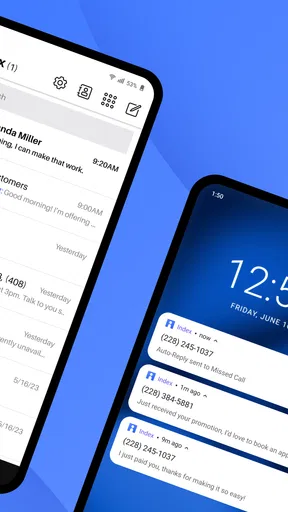
My preferred way to use a business-number app is to handle each interaction in a short sequence: identify the caller, answer or return the call, capture the next step, and close the loop. The app’s call routing, messaging, and voicemail transcription can support different parts of that routine. A missed call can become a readable message to review, and a text exchange can be used to confirm a time or clarify a detail without switching to a personal number.
For example, imagine a self-employed repair professional finishing a job when a new enquiry arrives. They can keep the customer conversation on the work line, read a voicemail transcription when they cannot listen immediately, then reply by text with a useful next step. The important benefit is not simply having another number; it is reducing the chance that a potential job disappears among personal calls and messages.
Where the handoff needs care
Routing calls to a personal device is convenient, but it does not automatically make a business conversation a team process. If someone else must take over, the owner still needs a reliable way to communicate the customer’s request and what has already been promised. I would use a consistent note-taking habit alongside calls, rather than assuming that a phone line alone will provide a complete shared customer history.
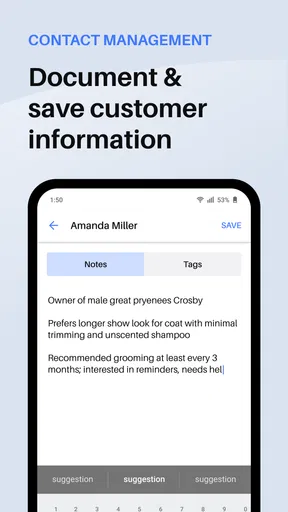
Contact and CRM connections can help if they fit the tools a business already uses. Before building a workflow around them, I would test one ordinary case: save a new contact, make a call, and check that the information appears where expected. That small trial can reveal whether the connection actually saves effort for the particular business, instead of adding another place to maintain records.
Worth Reading Before You Choose

Flipboard Shows What News Apps Must Do Beyond the Feed

Switching to Android Auto Means Rethinking Your Driving Routine

Google Calendar Makes a Crowded Week Easier to Manage

Ludo King Makes the Most of the Minutes Between Plans

Baby Panda World Brings Quick Play to Modern Phones, but Its Game Library Feels Busy

ESPN’s Live Game View Makes Following Close Games Easier
Who will get the most from it
Index is a business communication app from Pinger, Inc, and its focus suits solo operators, independent service providers, and small businesses that want a work number on a phone they already carry. It has a 3.8 average from around 200 ratings and more than 50,000 installs. That gives prospective users some adoption context, but I would still judge it by whether its calling and messaging routine matches their day.
The app is free to install and is rated for Everyone. In-app purchases range from about $25 to $200 per item, so I would check the options and costs shown in the app before making a paid commitment. It was released in July 2022, and version 13.12.1 is the current version. It requires Android 9 or later, which is worth checking before planning to use it on an older device.
Setting Up and First Impressions
Getting started with Index: Business Phone Number was a breeze. The app is available for both Android and iOS, so I headed straight to the app store, downloaded it, and I was up and running in no time. The interface is sleek and intuitive, making the initial setup feel like a walk in the park.
Once you open the app, it walks you through creating your first business number. The options are quite flexible, offering various area codes and the ability to choose a number that best suits your business vibe. I found this feature particularly useful for targeting specific regions.
Features That Stand Out
One of the standout features is the call routing. You can easily route calls to your personal device without revealing your personal number. This means you can maintain a professional boundary while still being reachable. Pretty neat, right?
Text messaging is equally seamless. The app allows you to send and receive messages as if you were using your regular phone number. I found the messaging interface smooth and responsive, which is a huge plus when you're trying to maintain effective communication with clients.
Index also supports voicemail transcription. This feature was a game-changer for me. Instead of listening to voicemails, I could quickly read transcriptions, saving a ton of time during my busy day.
From a quick reply to a closed task
A useful habit is to turn every unanswered enquiry into an explicit next action: return the call, send a text, or ask for a missing detail. Voicemail transcription can make that first triage faster, but I would still listen to the recording when a name, address, or other important detail is unclear. Transcribed text is handy for scanning; it should not be treated as infallible when accuracy matters.
For a busy day, I would also reserve a brief check-in time to review missed calls and open message threads, rather than letting each notification interrupt work. That approach is especially helpful for someone who alternates between customer-facing tasks and focused work. The dedicated line gives those interactions a home, but the owner still decides how promptly to respond and when the workday is over.
Using multiple numbers without creating confusion
The ability to manage multiple numbers from one device can help an owner keep separate activities apart, such as client work and a small side business. The trade-off is that each additional line creates another identity to monitor. I would give each number a clear purpose and use a consistent greeting, so callers know which service they have reached and I do not accidentally answer one business’s enquiry as another.
This is also where a quick pre-call check is worthwhile. Before returning a missed call, confirm which line the caller used and which business context applies. It is a small safeguard, but it can prevent an awkward conversation or a reply that exposes the wrong contact details. The convenience of switching lines works best when the person using them has a simple naming and follow-up routine.
Integrations and Usability
If you're like me and rely on a suite of productivity tools, Index won't disappoint. The app integrates with popular CRM and email services, making it a cohesive part of your workflow. This means you can log calls, save contacts, and even export data without a hitch.
The user experience is further enhanced by the app’s ability to manage multiple numbers from one device. This is perfect if you handle different businesses or need separate lines for various departments. Switching between numbers is just a tap away, and the app handles it without any lag.
How it compares with familiar alternatives
Compared with giving clients a personal mobile number, a business line is a cleaner boundary: work conversations have a distinct number, and calls can be routed to the device already in your pocket. Compared with carrying a second phone, it avoids another piece of hardware to charge and keep track of. Those are meaningful advantages for a solo operator, though they do not make the app equivalent to a staffed phone system with formal queues, shared coverage, or a receptionist.
A standard mobile line may be the better choice for someone who wants the simplest possible calling setup and does not need work and personal communication separated. A larger business may prefer a service designed around shared access and team administration. I would choose Index when the main need is one person managing business calls and texts conveniently, not when several employees need a carefully coordinated handoff across shifts.
Where the workflow can break
The most likely weak point is not the act of making a call; it is the process around that call. If a customer expects an immediate response while the owner is driving, serving someone else, or away from the phone, a separate number cannot solve the availability problem. Routing makes the line reachable through a personal device, but it is still sensible to set realistic expectations about when messages will be answered.
Another friction point is paying for a workflow before knowing how often it will be used. The app is free to install, but its in-app purchases mean that anyone considering ongoing use should look closely at the available purchase choices and decide whether the value matches their call volume. I would test the basic routine first, then pay only if the separate line is genuinely helping organize customer contact.
There is also a practical distinction between keeping conversations separate and maintaining business records. If a customer’s request needs a quote, appointment, or later service visit, I would move the relevant details into the business’s normal tracking method rather than relying on memory or scattered messages. That extra step is less elegant than an all-in-one system, but it protects against losing context when a conversation has to be handed to someone else.
Pricing and Availability
Let’s talk about pricing. Index offers a tiered subscription model, which is pretty industry standard. I found the rates reasonable, especially considering the range of features you get. There's also a free trial, so you can test the waters before diving in.
The app is available on both Android and iOS, which means no one is left out. Updates are regular, ensuring that the app stays fresh and functional.
Final Thoughts
Overall, my experience with Index: Business Phone Number was highly positive. The app simplifies the process of managing business communications, making it an essential tool for entrepreneurs and small business owners. The features are robust, yet the app remains user-friendly, striking the right balance between functionality and ease of use.
If you’re in the market for a business phone solution that doesn’t require extra hardware, Index could be just what you need. It keeps your personal and professional life separate while ensuring you never miss an important call or message. Give it a try and see how it can enhance your business operations.
My recommendation by working style
I would recommend trying it if you are the main person answering enquiries, want a distinct work number, and are comfortable managing customer follow-ups yourself. It is a practical fit for a consultant who schedules calls between appointments, a local seller who needs to answer order questions, or a freelancer who wants clients to text a business contact rather than a personal one. In each case, the strongest result comes from pairing the number with a simple habit: review missed contacts, record the next step, and close the loop.
I would skip it if your priority is a shared company inbox where several people can reliably see every conversation, or if you need complex call handling across a larger team. I would also avoid adding another line if you rarely receive work calls and are already happy with your current arrangement. A separate business number is most valuable when it fixes a real boundary or follow-up problem; otherwise, it can become one more inbox to check.
My bottom line is that Index is best viewed as a focused mobile tool for keeping business communication distinct, rather than a complete customer-management system. Its calls, texts, routing, voicemail transcription, and connections to other work tools can support a useful end-to-end routine, but the owner still has to decide who responds, capture commitments, and keep records in order. If that hands-on style suits your business, it is worth considering; if you need team-wide coordination, a more fully shared phone platform is likely the better match.
Pros
- Easy setup and integration.
- Affordable pricing plans.
- Reliable call quality.
- Comprehensive analytics tools.
- Supports international numbers.
Cons
- Limited customer support hours.
- No video conferencing feature.
- Requires stable internet connection.
- Mobile app lacks some features.
- Higher tiers may be pricey.
FAQs for Index: Business Phone Number
What is Index: Business Phone Number and how does it work?
Index: Business Phone Number is an app designed to provide users with a dedicated business phone number for professional communication. It allows users to maintain a separate line for business calls and messages, ensuring privacy and organization. The app integrates seamlessly with your phone, offering features like voicemail, call forwarding, and contact management.
Is Index: Business Phone Number available for both Android and iOS?
Yes, Index: Business Phone Number is available for both Android and iOS platforms. You can download it from the Google Play Store for Android devices and the Apple App Store for iOS devices. The app is designed to work smoothly on both operating systems, providing a consistent user experience.
What are the main features of Index: Business Phone Number?
Index: Business Phone Number offers a range of features including a dedicated business number, voicemail, call forwarding, and customizable greetings. It also provides options for contact management and message archiving, helping users keep their business communications organized and accessible. The app's interface is user-friendly, making it easy to navigate and manage your business interactions.
Are there any costs associated with using Index: Business Phone Number?
While the app itself may be free to download, there may be costs associated with using certain features or services. Some features might require a subscription or in-app purchases, such as premium numbers or additional minutes. It's advisable to review the app's pricing structure and terms before downloading to understand any potential charges.
How secure is my information with Index: Business Phone Number?
Index: Business Phone Number prioritizes user privacy and security. The app employs encryption and other security measures to protect your data and communications. However, it's essential to review the app's privacy policy and terms of service to understand how your information is handled and ensure it meets your security expectations.


